
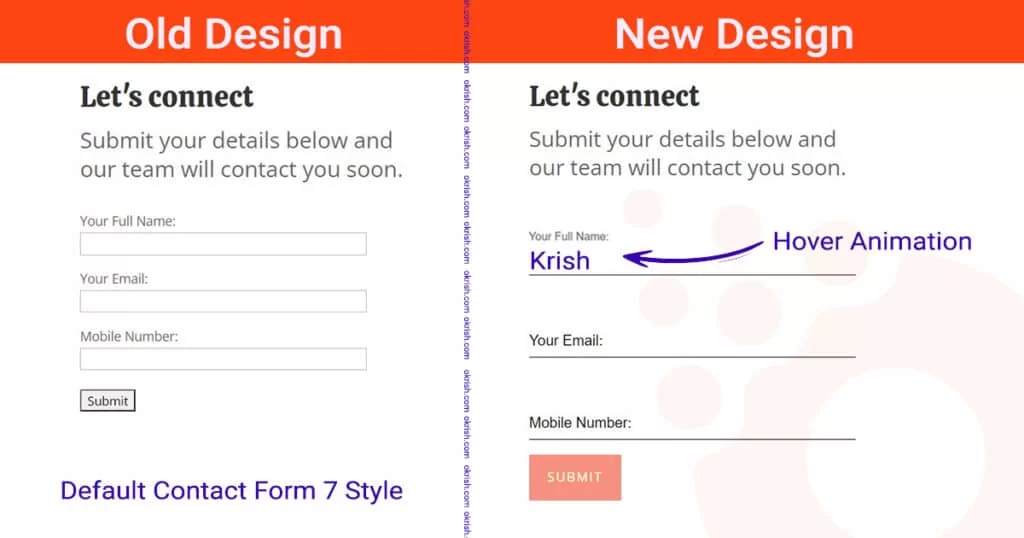
Contact Form 7 default form looks outdated. so in this blog post, we try to make it look modern using customer CSS and Javascript.

What is Contact Form 7 (CF7)?
CF7 is a free and lightweight contact form plugin for WordPress. CF7 provides the essential tools for anyone who wants to add a contact form to their site, without any fuss. CF7 is one of the most popular plugins on WordPress.org with more than 2 million downloads and counting. It has been translated into more than 40 languages.
Contact form 7(CF7) Code
By now I assume you have installed CF7 plugin if not click here to install the contact form 7 plugin.
Now go to your dashboard and head to Contact > Add New and copy-paste the below code
<p>
<label class="">Your Full Name:</label>
[text* FullName class:inputText]
</p>

<p>
<label class="">Your Email:</label>
[email* Email class:inputText]
</p>

<p>
<label class="">Mobile Number:</label>
[tel* telNumber class:inputText]
</p>

[submit "Submit"]
CSS Styles
Apply CSS with the Theme customizer
The simplest way to add custom CSS to WordPress is by inputting it in the Additional CSS section of the theme editor. This is an inbuilt WordPress CSS editor and will be present on all websites by default. However, keep in mind that.
To apply your CSS using the theme customizer, go to your dashboard and head to Appearance > Customize > Additional CSS to open the CSS editor.
In Divi Theme
If you are using divi theme you can easily add the code. go to your dashboard and head to Divi > General > Custom CSS. copy-paste the below code and customize it to match you site design.
.wpcf7-form > p {
  font-size: 16px;
  font-family: sans-serif;
  position: relative;
padding-bottom: -.5em;
}

.wpcf7-form > p label {
  position: absolute;
  top: 62%;
  transform: translateY(-50%);
  pointer-events: none;
  font-weight: normal;
  transition: top 0.2s;
  color: #000000;
}

.wpcf7-form input.wpcf7-text {
  border: none;
  border-bottom: 2px solid #7b7b7b;
  padding: 15px 0px;
  width: 100%;
  background-color: transparent;
  color: blue;
  font-size: 16px;
}
.wpcf7-form label.has-value {
  top: 20px;
  font-size: 11px;
}

.wpcf7-submit {
	color: #fdf8d6!important;
    border-width: 0px!important;
    border-radius: 0px;
    letter-spacing: 2px;
    font-size: 14px;
    font-family: 'Prompt',Helvetica,Arial,Lucida,sans-serif!important;
    text-transform: uppercase!important;
    background-color: #f69080;
	padding: 15px 20px;
	transition: all 300ms ease 0ms;
}

.wpcf7-submit:hover {
	cursor: pointer;
	color: #FDF8D6!important;
    background-image: initial;
    background-color: #88DDCC;
	box-shadow: 2px 6px 18px 0px #c47766;
}

.wpcf7-not-valid-tip {
    position: absolute;
    top: 35px;

}
JavaScript
Now add javaScript in Divi theme go to your dashboard and head to Divi > Integration > Body and add the code and click save.
<script>
	jQuery(document).ready(function($){
	// on focus
	$(".wpcf7-form .inputText").focus(function() {
			$(this).parent().siblings('label').addClass('has-value');
	})
	// blur input fields on unfocus + if has no value
	.blur(function() {
		var text_val = $(this).val();
		if(text_val === "") {
			$(this).parent().siblings('label').removeClass('has-value');
		}
	});
});
Cheers, we have successfully added the required code to make the form look awesome and the final output should look like below. Hope you enjoyed it.

If you have not yet added Material Design to your contact form, it’s time to take advantage of this trend!